Gallery One AI: Offline, private photo management for Android
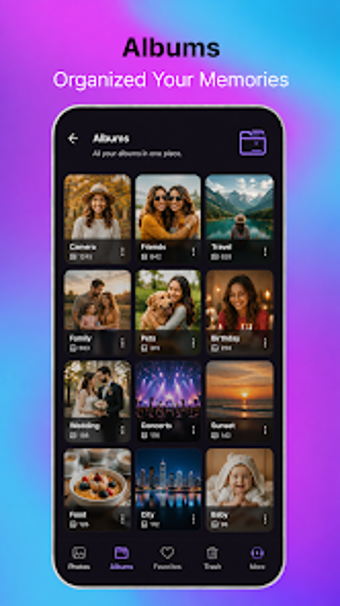
Gallery One AI, by VKGtecho, is an Android gallery aimed at private, offline photo management. It organizes media through on-device artificial intelligence and folder-based browsing, letting users sort and find images without cloud services. The app combines automated grouping with local file control to help people manage large personal libraries. Its design emphasizes speed and privacy for everyday and archival workflows.

Unlock your creativity with Adobe Stock
Get 10 images or 1 video with a free trial
How the app keeps your media private on the device
The app runs entirely offline, it does not upload photos or track data to external servers, and it places core protections on the device. A secure private vault protected by PIN or pattern hides sensitive files from casual access. Those choices mean all classification and grouping happens locally, which supports workflows that require strict control over personal images and videos.
What media and storage access the app uses
The tool supports common photo and video files and exposes the device's real directory structure for folder-based browsing. It is optimized to work with both internal storage and SD cards. To perform full file operations across storage, the app requests All Files Access, which enables move, rename, copy, and delete actions without intermediary importing. This model treats the gallery as a file manager plus viewer.
Is the interface suited for hands-on curation and quick edits?
The interface uses a Glass UI that prioritizes clear thumbnails and fast navigation. Built-in editing covers crop, rotate, and filter adjustments for quick corrections, while file-management controls let you rearrange assets directly. For users who edit and organize on-device, the combination of visual design and direct storage control shortens the time from capture to a curated collection.
How the app performs with large libraries and accidental deletes
The developer designed the app to handle large media libraries with high-performance playback and lightweight behavior even on extensive collections. On-device AI groups faces automatically, helping sort thousands of images without cloud processing. A recycle bin provides integrated recovery for mistakenly deleted files, reducing the risk of permanent loss during heavy reorganization sessions.
A practical choice for photographers prioritizing local control
The app is well suited to Android users who value strict local ownership and fast, private organization of photo libraries. Although its offline design limits cross-device cloud sharing, that same design ensures all processing and storage remain under the user's control. Choose the app when local privacy and rapid on-device curation matter more than cloud collaboration.